· 12 min read
How I built the TV
The projects on my homepage are channels on a TV. Here's how it works, step by step — the sizing, the picture, static, the CRT switch, the remote, teletext, the ticker and the ambilight.
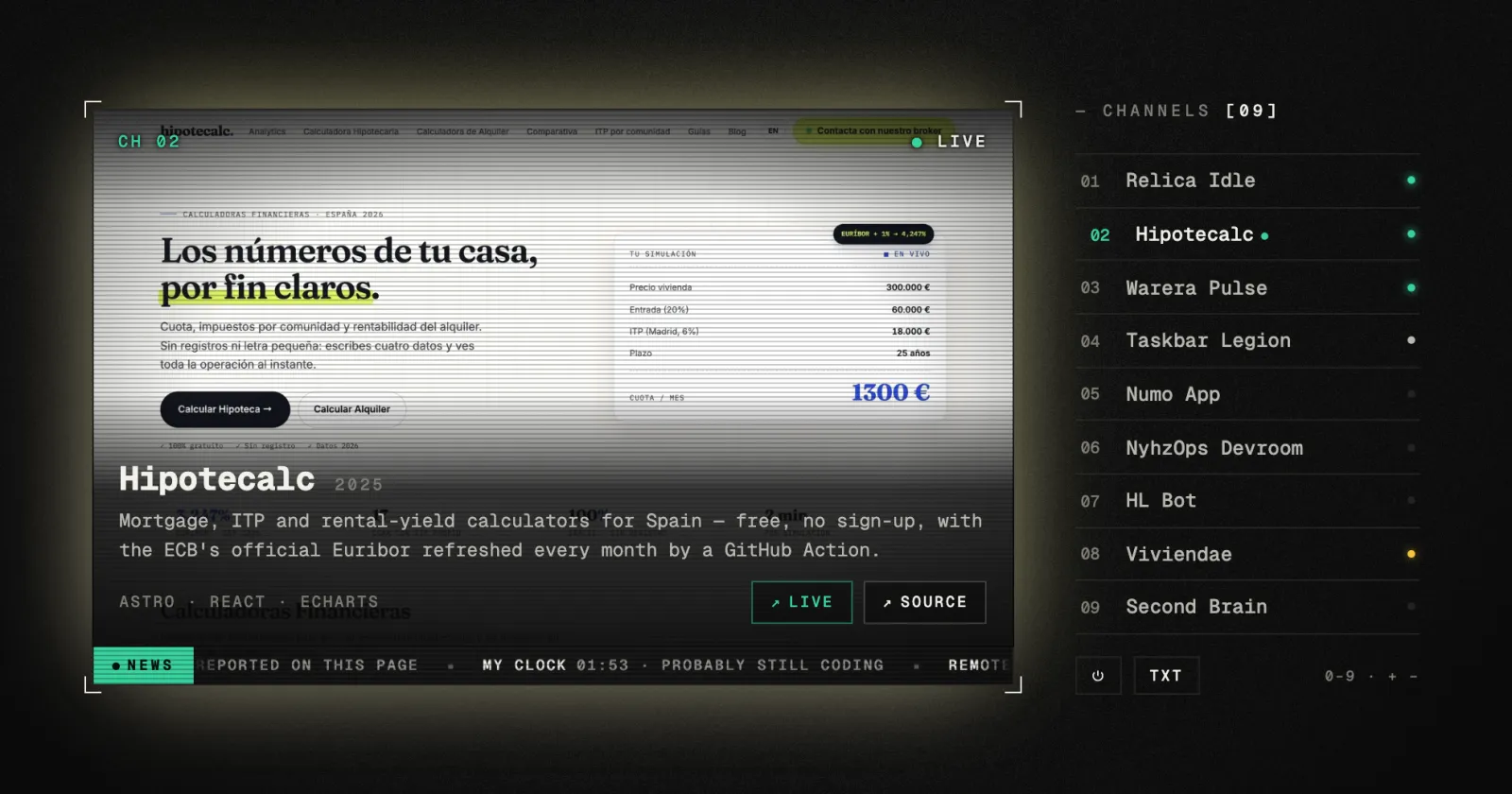
My portfolio is one screen with no scroll, and the work lives on a television. Each project is a channel. You can flick through them, type a channel number, switch the set off, read teletext, and if you leave it alone it channel-surfs like a TV in a shop window.
It’s one Astro component, plain DOM, GSAP for a few tweens and no framework. This is how it’s put together, in the order I’d build it again, with the bits that took more than one try.
1. One screen, always 16:10
The page never scrolls, so the TV can’t have a fixed size. It gets whatever room the hero leaves, and it’s as big as that room allows while staying 16:10: the width is the smaller of the room’s width and its height × 1.6, and the height follows. Both go into CSS variables (--tv-w, --tv-h), so the layout stays in the stylesheet and the script only measures.
Phones are the hard case. There everything stacks in one column: hero, picture, controls, description, links. On a short phone (or with Safari’s toolbars showing) that column is taller than the screen, and the links run into the page frame. So on phones the picture gives up height. It adds up what’s on the page, and if it overflows, the picture is cropped by exactly that much, down to a 2.5:1 letterbox at most.
The CSS only applies the height when the variable is there: .tv__screen[style*="--tv-gh"] .tv__glass { height: var(--tv-gh); }.
2. Two pictures, never a blank frame
Changing a channel means a new cover image. Set src on the visible <img> and you get a flash of nothing while it loads. So there are two images, stacked like a front and a back buffer. The next cover loads into the hidden one, and only when it’s ready do they swap: the back one gets is-top, the front one loses it, and they trade roles for the next change.
One detail is a real bug fix: before loading, the back image’s old onload is set to null. Flick through channels fast enough and an older load finishes after a newer one, swapping the wrong picture to the front.
Covers aren’t all 16:10. Anything more than 6% off is shown whole, never cropped, and the empty space is filled with the same picture, blown up, blurred and dimmed, the way TV news shows a vertical phone video:
.tv__img.is-contain {
  object-fit: contain;
  object-position: 50% 32%;
}

.tv__fill {
  position: absolute;
  inset: -8%;
  width: 116%;
  height: 116%;
  object-fit: cover;
  filter: blur(22px) brightness(0.42) saturate(1.2);
}
The inset: -8% matters: blur fades the edges to transparent, so the fill is made bigger than the screen and those soft edges fall outside it.
Covers are fetched as they’re needed, not all up front. Tuning a channel also preloads its two neighbours at low priority, so ◀ ▶ and the auto-surf rarely wait:
function warm(i: number) {
  i = (i + chans.length) % chans.length;
  const src = chans[i]?.dataset.cover;
  if (!src || warmed.has(i)) return;
  warmed.add(i);

  const im = new Image();
  im.decoding = 'async';
  im.fetchPriority = 'low';
  im.src = src;
}
The first line wraps the index round, so warming the neighbours of the last channel warms the first one too.
3. Static, the cheap way
Every TV needs static. It doesn’t need to be full resolution. It’s a 160×100 canvas filled with random greys, stretched over the screen with image-rendering: pixelated, so it reads as chunky analogue noise and costs almost nothing: 16,000 pixels a frame, each one a single Math.random().
A burst(ms) sets staticUntil, shows the canvas and fades it out. The loop stops on its own when time’s up, so static only costs anything while you’re actually seeing it.
4. The channel change
A real set doesn’t cut cleanly between channels. The picture rolls and the colours split. That’s a four-step keyframe on the incoming picture: a vertical jump, a skew, and the chromatic split done with two coloured drop-shadows, one red to the left and one cyan to the right:
.tv__glass.is-roll .tv__img.is-top {
  animation: tvRoll 0.32s steps(4) 1;
}

@keyframes tvRoll {
  0% {
    transform: translateY(-18%);
    filter: drop-shadow(-6px 0 rgba(255, 46, 99, 0.8))
            drop-shadow(6px 0 rgba(46, 230, 255, 0.8))
            brightness(1.6);
  }
  40% { transform: translateY(9%) skewX(-4deg); }
  70% { transform: translateY(-3%); }
  100% { transform: none; }
}
steps(4) is what makes it feel like hardware instead of a CSS transition: four hard frames, no easing. To replay it on every change, the class is removed, a reflow is forced, and it’s added again (void glass.offsetWidth between the two).
On top of that comes a burst of static, a glitch sound if you’ve turned sound on, the channel number flashing big in the middle (CH 04 in three stepped fades), and the title decoding in: random characters that lock into the real ones, left to right. Every 32 ms another ninth of the title settles, and the rest is redrawn from a set of glyphs.
Whoever writes the title next clears decodeIv first. Otherwise a decode still running from the previous channel scribbles over the new title.
5. Switching it on and off
An old tube switches on as a bright horizontal line that opens out into the picture, and switches off by squeezing the picture to a line, then the line to a dot. Both are clip-path: inset() tweened from the middle, plus a separate glowing line element on top. Switching on, the line grows from a dot to full width in 0.2 s, the picture opens out of it from inset(50% 0% 50% 0%) to inset(0% 0% 0% 0%), and the line fades as it goes.
Two things went wrong on the way here.
I clipped the wrong element. The first version clipped the glass, and the glass has the border, so the whole set visibly shrank and grew again. Now the picture lives in its own inner layer (.tv__pic), and only that is clipped. The glass, its border and its dark background stay put, so you see the picture collapse inside a TV that doesn’t move.
The tween opened from the top only. I’d written .to(pic, { clipPath: 'inset(0% 0 0% 0)' }). GSAP reads the starting value from the computed style, and the browser normalises inset(50% 0 50% 0) to the shortest form, inset(50% 0px): two values. Tweening two values into four, they don’t pair up. The bottom snapped to 0 and only the top animated. Giving explicit from-values with all four sides fixed it. Lesson: when tweening shorthand values, never trust the computed one.
6. Left alone, it surfs
After it’s switched on, if nobody touches it, the TV hops to the next channel every 7 seconds, like a TV in a shop window. A thin bar along the bottom of the picture fills up to show the countdown. It’s the timer itself: one GSAP tween from scaleX: 0 to scaleX: 1 over 7 seconds, whose onComplete changes the channel and starts the next one. There’s no setInterval to keep in step with the bar, because the bar is the interval, and pausing it pauses both.
Every fourth hop is an ad break. Surfing stops whenever it would be rude: while you hover the channel list, after you pick a channel (it locks; click it again to let it go), while the contact form or teletext is open, and while the tab is hidden (attract.pause() on visibilitychange).
7. The remote
On desktop the number keys are a remote. Type 4 and after a beat it tunes to channel 04. Type 1 then 2 quickly and you get 12. The digit logic is pure, so it’s tested without a DOM:
export function remoteDigit(buffer: string, digit: string, max: number) {
  const next = (buffer + digit).slice(-max);
  return { buffer: next, ready: next.length >= max };
}
While you type, the on-screen display shows CH 1_, and the volume keys draw their bar the same way, out of plain characters:
/** "CH 0_" while you type, "CH 07" once it's in */
export const remoteLabel = (buffer: string, max = 2) => buffer.padEnd(max, '_');

export const VOL_MAX = 8;
export const volumeBar = (level: number) =>
  `VOL ${'▮'.repeat(level)}${'▯'.repeat(VOL_MAX - level)}`;
If the number isn’t complete after a second, it’s acted on as it is.
What a number tunes to is also pure. A union type names every kind of channel, so the ones that aren’t in the list are easy to add, and the compiler checks each one is handled:
export type Channel =
  | { kind: 'project'; index: number }
  | { kind: 'contact' }
  | { kind: 'secret' }      // CH 42
  | { kind: 'horror' }      // CH 13
  | { kind: 'nosignal'; n: number };

export function channelFor(n: number, count: number): Channel {
  if (n === 0) return { kind: 'contact' };
  if (n >= 1 && n <= count) return { kind: 'project', index: n - 1 };
  if (n === 42) return { kind: 'secret' };
  if (n === 13) return { kind: 'horror' };
  return { kind: 'nosignal', n };
}
+ and − are the volume. The sound is synthesised with the Web Audio API, no audio files: square waves for beeps, filtered noise for the glitches.
8. Teletext
Press t and you get teletext: 40 columns of blocky coloured text on black, with page numbers. A page is data, rows of [colour, text] segments using teletext’s own seven colours, built from the same content as the rest of the site:
{ segs: [['y', ' 103 '], ['w', 'projects · the guide']], link: 103 }Pages are written with a couple of tiny helpers. This one makes the dotted leaders of an index:
const dots = (k: string, w = 12) =>
  `${k} ${'.'.repeat(Math.max(1, w - k.length))} `;
So a page reads almost like the screen it makes:
case 101:
  return [
    title('ABOUT'),
    blank,
    { segs: [['c', dots('name')], ['w', ctx.name]] },
    { segs: [['c', dots('role')], ['w', ctx.role]] },
    { segs: [['c', dots('based')], ['w', ctx.location]] },
  ];
The only tricky part is making 40 columns fit whatever size the screen is. The font size is computed from the screen twice, once for the width and once for the height, and the smaller wins.
The width allows 46 characters (the 40 columns and their margins) at 0.62 em each, the width of one monospace character; the height allows 19 rows at a line height of 1.22. Type three digits for a page, or click a row.
9. The news ticker
Along the bottom of the picture runs a news strip with real headlines: which deploys are answering (and how fast), my last push on GitHub, how many secrets you’ve found, my local time. An endless strip that never jumps comes down to one trick: the headlines go into the track twice, and the track slides exactly half its width, then starts again.
.tv__news-track {
  display: flex;
  animation: newsRun var(--news-dur) linear infinite;
}

@keyframes newsRun {
  to { transform: translateX(-50%); }
}
When it loops back, the second copy is exactly where the first one started, so you can’t see the seam. The duration is half the width divided by a speed in px/s, so the reading pace is the same however many headlines there are.
The data arrives while the strip is moving, and swapping the headlines mid-lap would make the text jump. So new headlines wait for animationiteration, the one moment the loop is back at its start, unless the strip isn’t on screen, in which case they go straight in.
The headlines come from the same data as the frame’s “last push” line in the corner. Two places ask, but there’s only ever one request: the first caller starts it and everyone shares the promise.
const get = <T>(url: string) =>
  fetch(url)
    .then((r) => (r.ok ? (r.json() as Promise<T>) : null))
    .catch(() => null);

let act: Promise<Activity | null> | null = null;

/** the latest push, fetched once and shared */
export const activity = () => (act ??= get<Activity>('/api/activity'));
Nothing throws: no data is just null, and the headline is left out.
One headline is my clock: the time where I am, and a guess at what I’m doing.
export function doing(h: number, day: number): string {
  const weekend = day === 0 || day === 6;
  if (h < 2) return 'probably still coding';
  if (h < 7) return 'asleep, probably';
  if (h < 9) return 'coffee first';
  if (h < 14) return weekend ? 'out and about' : 'at work';
  if (h < 16) return 'lunch';
  if (h < 20) return weekend ? 'building things' : 'at work';
  if (h < 22) return 'dinner';
  return "side projects o'clock";
}
10. Ambilight
The last touch: the light around the set takes the colours of the picture, like the Philips TVs. The cover is drawn into a 32×20 canvas (640 pixels is plenty to know what colour an edge is), and a band along each edge is averaged. The four colours land in four CSS variables, and the CSS does the rest:
.tv__glass {
  box-shadow:
    -24px 0 64px -20px var(--amb-l, transparent),
    0 -24px 64px -20px var(--amb-t, transparent),
    24px 0 64px -20px var(--amb-r, transparent),
    0 24px 64px -20px var(--amb-b, transparent);
  transition: box-shadow 0.9s ease;
}
A raw average looks wrong: a dark cover glows black, a white one glares. glow() goes through HSL and keeps the lightness between 34% and 62%, pushing the saturation up a little. And since box-shadow transitions, changing channel fades the light from one picture’s colours to the next.
11. What search engines and screen readers see
All of the above is pictures and data- attributes, which neither a search engine nor a screen reader can do much with. So the same projects are also in the page as plain text: a visually hidden section with a heading, an article per project and real links. The links are kept out of the tab order, because keyboard users have the channel list.
<section class="tv__index" aria-labelledby="tv-index-h">
  <h2 id="tv-index-h">projects</h2>
  <article>
    <h3>Hipotecalc (2025)</h3>
    <p>Mortgage, ITP and rental-yield calculators for Spain…</p>
    <a href="https://…" tabindex="-1">Hipotecalc — live</a>
  </article>
</section>
The decorative parts (the on-screen display, the ticker, the remote) carry data-nosnippet, so Google doesn’t quote “CH 04 ● LIVE” as the page’s description. With prefers-reduced-motion, there’s no roll and no surfing, and the ticker shows one headline at a time instead of scrolling.
Tricks worth stealing
- Two image layers for any picture that changes: load into the back one, swap when ready, and null the old
onloadhandler. - Low-resolution canvas +
image-rendering: pixelatedfor noise, scanlines or anything retro. Cheap and better looking. steps()on a keyframe animation makes motion feel mechanical instead of smooth.- Clip the content, not the container, when the container has a border.
- Never tween shorthand from its computed value. Give explicit from-values.
- A doubled track and
translateX(-50%)for any seamless marquee, with changes applied atanimationiteration. - A tiny canvas to read an image’s colours: you rarely need more than a few hundred pixels.
- Keep the logic pure (
channelFor,remoteDigit, the teletext pages, the headlines). Then it’s unit-tested, and the component is just wiring.